Guide/
How to Save in GTA 6: Manual Save, Autosave & 15 Save Slots
In breve
To save in GTA 6, open the pause menu (Options on PS5, Menu on Xbox), go to Game > Save Game and pick one of 15 manual slots. It works anywhere in free roam, but not during the Prologue, during a mission or after using a cheat. The game also autosaves to one slot that keeps overwriting itself. Finished missions can't be replayed, so manual saves are your only way back.
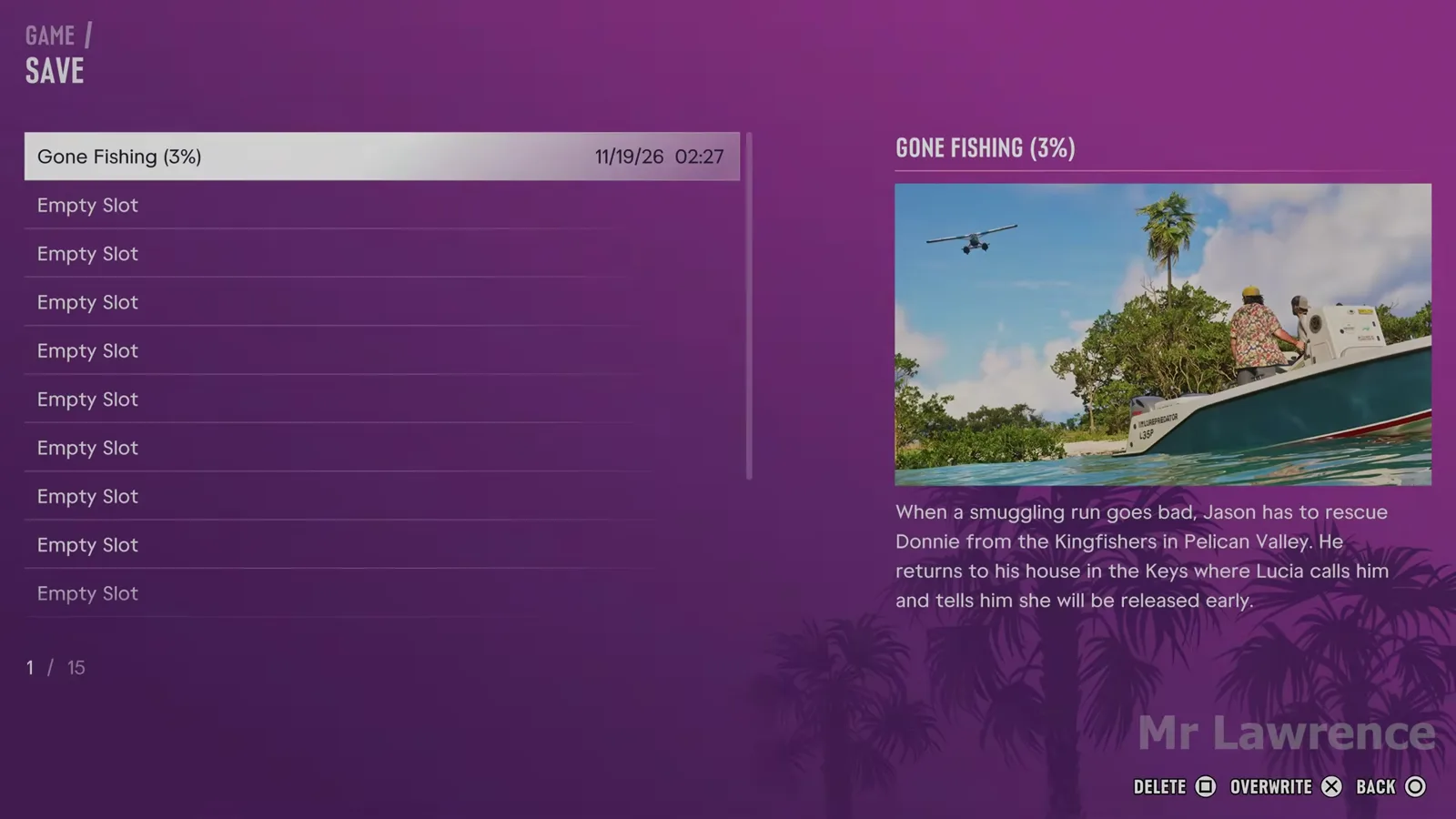
How to save in GTA 6 (PS5 and Xbox Series X|S)
- Finish or leave any active mission. Saving is locked while a mission is running.
- Open the pause menu: Options on PS5, Menu on Xbox Series X|S.
- Go to the Game tab and choose Save Game.
- Pick an empty slot, or overwrite one you no longer need, and confirm.
- Let the save finish before you quit to the main menu or turn the console off.
You can save like this anywhere in free roam, so there's no need to drive back to a safehouse. KeenGamer, MetaForge and GTA BOOM all describe it as a quick save outside missions. To load, use Game > Load Game and choose either the autosave or one of your manual saves.
When you can't save
| Situation | Why | What to do |
|---|---|---|
| During the Prologue | Manual saves unlock once the opening is over and Jason is at his house (GameRant, KeenGamer) | Play on. The game autosaves until then |
| During a mission | Manual saves are blocked for the whole mission (Beebom, GTA BOOM, KeenGamer) | Save before you start, or after you finish |
| After entering a cheat | Any cheat disables saving (and trophies) for that session (GTA BOOM, KeenGamer, PowerPyx, GTABase) | Close the game completely and relaunch it. Save before you use cheats |
Autosave: one slot that keeps overwriting itself
GTA 6 autosaves after missions and certain open-world events, all into one dedicated autosave slot. Every new autosave replaces the last one (Beebom, KeenGamer, GTA BOOM). Autosaves don't overwrite your manual slots. Eurogamer notes the autosave is there to help if you're Busted or Wasted.
The risk is that an autosave can land right after something you regret, such as a bad story choice or a robbery that went wrong. At that point the earlier state is gone unless a manual save has it. MetaForge adds one more warning (only MetaForge reports this): loading an older manual save also overwrites the autosave, so loading the wrong slot can cost you your latest progress.
How many save slots does GTA 6 have?
15 manual save slots plus 1 autosave slot. GameRant, Beebom, KeenGamer, MetaForge, Eurogamer, IGN and GTA BOOM all agree on this.
There is no mission replay
You can't replay a finished mission in GTA 6. There's no Replay Mission menu like GTA 5 had, and no gold medals either. Eurogamer confirmed this during its 100+ hour review playthrough, and IGN and GTA BOOM confirmed it too. Rockstar's VP of technology, David Hynd, told Eurogamer that the team instead "wanted to reduce the number of Mission fails for the player experimenting or trying something different". Missions are more open, so you're less likely to fail one in the first place.
The only way back to an earlier point in the story is a manual save you made before it. Eurogamer and IGN both suggest making a new save roughly every 7% of the story so you're never far from a moment you might want to return to.
A save-slot plan for 15 slots
Based on the advice from PowerPyx, MetaForge and KeenGamer:
| Slots | Use |
|---|---|
| 1 | Right after the Prologue, a clean start |
| 5 | Start of each chapter (1 to 5) |
| 5 | End of each chapter, before the story moves you to a new area |
| 2 | Before big story choices or heists, overwritten as you go |
| 2 | Rotating free-roam saves, alternated after every mission |
Keep at least one save you've never used cheats on. PowerPyx and GTABase note that cheats also disable trophies.
How not to lose progress (and your weapons)
- Make a manual save after every big purchase or haul. That includes new weapons, a car you've modded or a pile of cash. Autosaves are tied to missions and certain world events, so don't count on one straight after you shop.
- Stash cash early on. KeenGamer says dying or getting arrested costs you the cash you're carrying, and that the floorboards in Jason's bedroom work as a stash until banking opens in Buck Me. Only KeenGamer reports this.
- Alternate your free-roam slots instead of overwriting the same one, so a bad save never leaves you stuck.
- Back up to the cloud. KeenGamer notes that PS5 saves back up to PlayStation Plus cloud storage and Xbox Series X|S saves sync to the cloud automatically. On PS5, check that auto-upload is turned on in the console's saved-data settings.
- Let the save finish before you quit, rest mode the console or pull the power.
Weapons missing after restarting the game
Players have reported that after quitting and relaunching GTA 6, Jason or Lucia is missing some weapons, and food and rest stat bonuses are gone. It's on our tracker as unconfirmed: GTA 6 weapons disappearing and stat bonuses lost after restarting. There's no confirmed fix yet. Until there is, keep a manual save from just after you bought your weapons, and if it happens to you, add your console and what you lost to the report.
Known save and progress bugs
Lost a save, saw a "save failed" message or a slot that won't load? Report it and tell us your console and what you were doing when it happened.
FAQ
- How do you manually save in GTA 6?
Pause the game (Options on PS5, Menu on Xbox), go to Game > Save Game and pick a slot. You can do it anywhere in free roam.
- How many save slots does GTA 6 have?
15 manual save slots plus one autosave slot.
- Can you save during a mission in GTA 6?
No. Manual saving is locked for the whole mission. Save before you start or after you finish.
- Can you replay missions in GTA 6?
No. There is no mission replay. The only way to play a mission again is to load a manual save you made before it.
- Does the autosave overwrite manual saves?
No. Autosaves go to their own slot, but each autosave replaces the previous one. MetaForge also warns that loading an older manual save overwrites the autosave.
- Why can't I save in GTA 6?
You're in the Prologue, in a mission, or you used a cheat this session. Cheats disable saving until you fully close and restart the game.
- Why did I lose weapons after restarting GTA 6?
Players have reported weapons and stat bonuses disappearing after a relaunch. It's an unconfirmed bug with no confirmed fix yet. Keep a manual save right after you buy weapons, and add your report to our bug page.
Fonti
- 01Eurogamer: You cannot replay missions in GTA 6, but you can use multiple save files — no replay, 15 slots + autosave, David Hynd quote
- 02IGN: GTA 6 doesn't let you replay story missions — 15 slots, save every ~7%
- 03GameRant: How to save in GTA 6 — Start > Game > Save Game, unlocks after the Prologue
- 04Beebom: How to save your game in GTA 6 — Options/Menu, no saving in missions, separate autosave slot
- 05KeenGamer: How to save in GTA 6 — cheats block saving, cloud backup; single source for cash loss on death and the floorboard stash
- 06MetaForge: How to save in GTA 6 — single source for loading a manual save overwriting the autosave
- 07GTA BOOM: GTA 6 has a new save system and won't let you replay story missions
- 08PowerPyx: GTA 6 trophy guide & roadmap — cheats disable trophies and saving, chapter save plan