GTA 6 too dark on PS5: night scenes pitch black, brightness slider does nothing
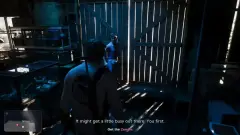
On PS5, everything below mid brightness (night, shadows, interiors) renders pure black while menus look fine, and the in-game brightness slider has no effect.
Workaround
No official fix yet. Things to check: re-run PS5 Settings > Screen and Video > Video Output > Adjust HDR; try turning HDR off on the console (or set it to "On When Supported") to see if detail returns; check the TV's picture mode and black level / HDMI range (Auto/Full on both PS5 and TV); then restart the game and retry the in-game brightness/HDR sliders.
Unsubscribe with one click from any email.
What happens
A PS5 player reports that any low-light area — night scenes, shadowed streets, building interiors — is completely black, while the HUD and menus display normally and bright scenes look fine. Moving the brightness slider in GTA VI's settings makes no visible change. Single report so far (unconfirmed); it looks like a black-level/HDR calibration problem rather than a graphics crash.
Steps to reproduce
Play GTA VI on PS5 at night or indoors; dark areas crush to black and changing in-game brightness doesn't help.
Related bugs
- 0Votes
- 0Votes
- 0Votes
Hot right now
- 2Votes
- 9Votes


Discussion
Join the discussion
No account needed. Be civil, no personal info, no piracy or cheat links.
No replies yet. Can you reproduce it? Found a workaround? Start the thread.