GTA 6 minimap disappearing or not showing: how to keep it always on
If the GTA 6 minimap keeps vanishing, it is usually the "Dynamic" Navigation Experience you picked at first launch, not a broken HUD. Switch to Minimap Always On in Settings → UI.
Solución temporal
Pause Menu → Settings → UI → Navigation: set the minimap to always on (or pick Minimap Always On on the first-launch Navigation Experience screen). In the Dynamic modes, tap the D-pad to show the minimap for a moment. If the HUD looks cut off, adjust the in-game safe zone and set your TV to "Just Scan"/"Screen Fit" instead of starting a new save.
Date de baja con un clic desde cualquier correo.
Qué ocurre
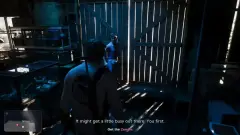
The first thing GTA 6 asks on a new save is which Navigation Experience you want, and it does not preview the options. Two of the three choices, Minimap (Dynamic) and Minimap & Compass (Dynamic), hide the minimap in quiet moments, such as walking around Jason's house, and only bring it back when it is needed, in action sequences or when you press the D-pad. Many players read this as the minimap being bugged or missing.
The third choice, Minimap Always On, keeps it on screen during normal gameplay. You can change it at any time without starting a new game. The map still disappears during cutscenes, loading screens and some scripted moments with any setting, which is expected.
If the minimap stays missing even with Always On selected, check the game's safe-zone setting and your TV's picture size or overscan mode, as a cropped image can cut off the edges of the HUD. If it still won't appear, report it to Rockstar Support with your console model and what you changed.
Pasos para reproducirlo
- Start GTA 6 for the first time and pick Minimap (Dynamic) or Minimap & Compass (Dynamic).
- Walk around a calm area such as Jason's house: the minimap fades out.
- Press the D-pad: it reappears for a few seconds and then hides again.
Bugs relacionados
- 0Votos
- 0Votos
- 0Votos
- 0Votos
Lo más caliente
- 2Votos
- 0Votos
- 2Votos
- 2Votos


Discusión
Únete a la discusión
No hace falta cuenta. Respeto, nada de datos personales, piratería ni enlaces de trampas.
Aún no hay respuestas. ¿Puedes reproducirlo? ¿Has encontrado una solución? Abre la conversación.