Guides/
Best GTA 6 Settings for PS5, PS5 Pro and Xbox
Kurz gesagt
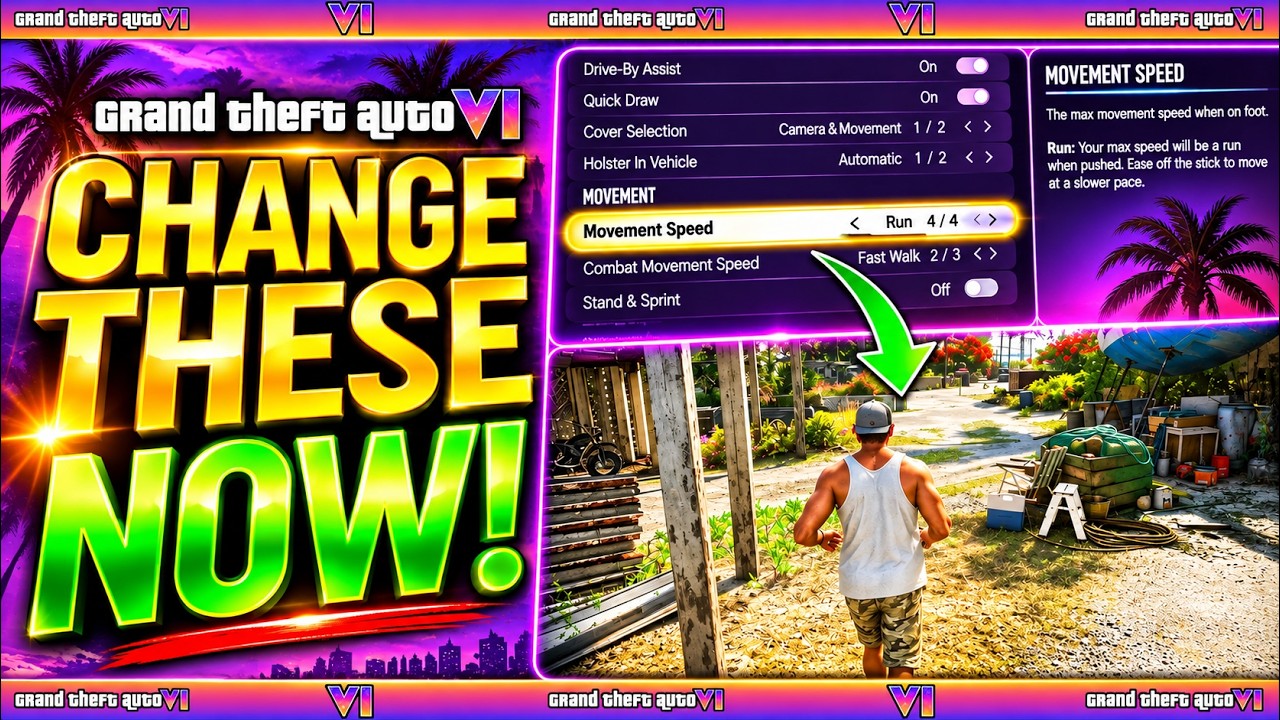
GTA 6 has no performance or quality mode. It targets 30 fps on PS5, PS5 Pro, Xbox Series X and Series S, and there's no 60 fps option. Change these first: Motion Blur Strength to 0 (Display), Look and Aim Sensitivity from 7 up to about 9-10 (Controller), Movement Speed to Jog or Run (Gameplay), and Camera Shake off (Camera). Then calibrate HDR and put your TV in Game Mode. The PS5 Pro applies PSSR and ray-traced shadows automatically.
Is there a performance mode in GTA 6?
No. The Display tab has no resolution, frame rate or graphics preset options, and every console targets 30 fps (KeenGamer, Output Lag). Rockstar's technology production director Marc Chambers told Kotaku that even the PS5 Pro's CPU isn't powerful enough for 60 fps, so no performance mode is planned after launch either (Kotaku, VGC).
| Console | Frame rate | Image |
|---|---|---|
| PS5 Pro | 30, close to locked (brief dips around big explosions) | About 1440p, PSSR to near-4K, ray-traced shadows |
| PS5 | 30 with dips in heavy chaos | About 1440p, softer |
| Xbox Series X | Mostly 30, upper 20s in big fights | About 1440p |
| Xbox Series S | Often mid to upper 20s | About 720p internal, upscaled |
Figures as reported by Output Lag and KeenGamer.
In-game settings to change first
Open Pause Menu > Settings. Switch tabs with L1/R1 (LB/RB). Every tab has Restore Default.
- Display > Motion Blur Strength: 0. At 30 fps the blur smears every fast camera turn. Output Lag suggests 1-2 if 30 fps feels choppy without it.
- Controller > Look and Aim Sensitivity: 9-10 (default 7, max 14). Raise Look and Aim Acceleration for a snappier camera (Output Lag).
- Gameplay > Movement Speed: Jog or Run. It saves clicking L3 to sprint all the time. Combat Movement Speed is a separate setting.
- Camera > Comfort: Camera Shake off, Camera Bob 0 if you get motion sick.
- Camera > Cinematic: Vehicle Crash Frequency to its lowest, so slow-motion crash cams don't take control away mid-chase.
- UI > Reticle: Projectile Arc always on, and bigger map blips while you learn the map.
- Display > Hit Effects Intensity lower, if screen flashes in fights bother you.
- Audio > Narration > Screen Narration: Off if the menus are being read aloud.
- Leave Stand & Sprint off, or sprinting from a crouch stands you up and can blow your cover.
There's no first-person mode at launch. The only first-person view is the phone camera (Output Lag).
Console and TV settings
- HDR: set it to On When Supported, then run Adjust HDR (PS5: Settings > Screen and Video > Video Output) or Calibrate HDR for Games (Xbox: Settings > General > TV and display options), then the in-game HDR Calibration (KeenGamer).
- TV Picture Mode: Game Mode to cut input lag.
- Motion smoothing off (TruMotion, Motion Plus, Motionflow and similar). It adds lag and smearing.
- Resolution: Automatic so a PS5 Pro sends 4K to your TV.
- VRR / 120Hz: they don't raise the 30 fps cap. Output Lag says VRR can smooth dips on Series X. Beebom suggests leaving 120Hz on Automatic and switching it off if you see tearing.
- Audio: set up 3D Audio on PS5 (Settings > Sound > 3D Audio) or Windows Sonic / Dolby Atmos on Xbox.
PS5 Pro: what's different
Nothing to switch on. PSSR upscaling and ray-traced shadows apply automatically, and the frame rate stays at 30. The Pro spends its extra power on a sharper image and steadier frame pacing (KeenGamer, quoting Rockstar's pre-load announcement).
- 2Stimmen
- 3Stimmen
- 0Stimmen
- 2Stimmen
- 0Stimmen
- 0Stimmen
- 0Stimmen


FAQ
- Does GTA 6 have a performance mode?
No. There are no graphics modes on any console, and the game targets 30 fps.
- Is GTA 6 60 fps on PS5 Pro?
No. The PS5 Pro is also 30 fps; it uses its power for PSSR upscaling and ray-traced shadows.
- How do you turn off motion blur in GTA 6?
Settings > Display > Motion Blur Strength, set the slider to 0.
- What is the best sensitivity in GTA 6?
Many players raise Look and Aim Sensitivity from the default 7 to about 9 or 10.
Quellen
- 01KeenGamer: Best GTA 6 settings to change first — no graphics modes, display/camera settings, PS5 Pro PSSR
- 02Output Lag: GTA 6 best settings and controls — per-console fps/resolution, setting values
- 03Beebom: Best PS5 settings for GTA 6 — console video and audio settings
- 04Kotaku: GTA 6 won't get a 60 FPS mode, even on PS5 Pro — Rockstar statement, 30 fps on all platforms
- 05VGC: Rockstar says PS5 Pro can't handle GTA 6 at 60 FPS — Marc Chambers, no post-launch 60 fps