GTA 6 plane keeps beeping: Dodo seaplane and stolen jets won't stop beeping
A steady warning beep plays nonstop in Brian's Dodo seaplane and in stolen jets, no matter what you do with the landing gear, engine or altitude. It is an audio bug, not a real warning.
Quick answerConfirmed on PS5 and Xbox Series X|S; no official patch as of . 2 player fixes, most-confirmed first: “Turn the SFX volume down while flying”. See Fix #1 below ↓
Update 01.002.002 is out (23. Nov. 2026). Rockstar hasn't said if it fixes this bug: update, test it and vote on the fix below.
Workaround
Changing the landing gear, the engine or your altitude does not stop the beep, because it is an audio bug rather than a real warning.
2 different fixes players reported. Try them one at a time: if Fix #1 doesn't help, open Fix #2.
Fix #1Turn the SFX volume down while flying
- Press Options (PS5) or Menu (Xbox) to open the pause menu.
- Go to Settings > Audio.
- Lower the SFX Volume slider until the beep stops bothering you.
- Land the plane, then set SFX Volume back to where it was so you can hear gunfire and cars again.
Did Fix #1 work for you?Fix #2Take a helicopter instead of a plane
- For free-roam trips, use a helicopter from a helipad (the H icon on the map) instead of a plane.
- Helicopters do not play the beep, so the flight is quiet.
Did Fix #2 work for you?TipWhile you wait for a patch
- The beep is harmless: keep flying, the plane is not damaged or tracked because of it.
- Report it to Rockstar Support (support.rockstargames.com) so it gets into a hotfix.
- Tap 'Get notified when this is fixed' on this page to hear when a patch fixes it.
In jeder E-Mail mit einem Klick abbestellbar.
Still broken? Tell Rockstar
This isn't a share button: it's a complaint that goes to Rockstar. The support form sends a ready report to Rockstar Support (we copy the text, you sign in with your Rockstar account and paste). X and Threads post it publicly with @RockstarSupport / @rockstargames tagged, so Rockstar sees how many players are stuck. The more players do it, the faster it gets fixed.
0players sent it
Preview the report
Subject: GTA VI bug report: plane keeps beeping: Dodo seaplane and stolen jets won't stop beeping

Hello Rockstar Support,

I'm reporting a bug in Grand Theft Auto VI that many players are hitting.

What happens: A steady warning beep plays nonstop in Brian's Dodo seaplane and in stolen jets, no matter what you do with the landing gear, engine or altitude. It is an audio bug, not a real warning.

What I and other players have already tried (it does not fix it for everyone):
- Turn the SFX volume down while flying
- Take a helicopter instead of a plane
- While you wait for a patch

Platform: PS5 / Xbox Series X|S (my console: ____ )
Game version: latest update installed

Full details, steps and reports from other affected players: https://gta6bugs.com/bugs/gta-6-plane-keeps-beeping-seaplane

Please pass this on to the GTA VI team and let us know if a fix is planned.

Thank you
Video
Still broken? Ask other players on Discord · Know a fix? Get paid if it works for others
Was passiert
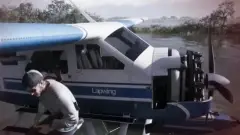
Many players report a constant beeping sound while flying planes in GTA 6. It started with Brian's Dodo seaplane (Down to Earth and later the Aerial Application job) and also shows up in stolen jets. On r/GTAVI, u/flydogfly said it kept going after raising and lowering the gear, turning the engine off and on, and even after Donnie repaired the plane; at least eight other players in that thread said the same happens to them. On launch night TGG ran into it live on stream and tried flying at sea level and at 30 feet, and it still beeped.
A new report on r/GTAVI (u/MakoWarrior_) describes it from the stealing side: when you steal a plane, the "stay under" height for staying off radar shows 0 feet, so the plane beeps the whole flight.
The beep does not mean low fuel, a stall or a tracker. Rock Paper Shotgun and Output Lag both treat it as a launch audio bug, and nothing happens to the plane. u/Matt-The-Guitar-Guy noticed it does not happen in helicopters. Rockstar has not mentioned it in patch notes yet.
Schritte zum Nachstellen
- Take Brian's Dodo seaplane in Down to Earth, or steal a jet or plane.
- Take off and fly at any height.
- A repeating beep starts and keeps going until you land, whatever you do with the gear or engine.
Spieler melden das
- 2
- 468
- 3
Weitere Clips zu diesem Bug
Quick FAQ
- What is “plane keeps beeping: Dodo seaplane and stolen jets won't stop beeping” in GTA 6?
- A steady warning beep plays nonstop in Brian's Dodo seaplane and in stolen jets, no matter what you do with the landing gear, engine or altitude. It is an audio bug, not a real warning.
- How do I fix “plane keeps beeping: Dodo seaplane and stolen jets won't stop beeping”?
- Players reported 2 fixes; try them in order: 1. Turn the SFX volume down while flying — worked for Rock Paper Shotgun, r/GTAVI players. 2. Take a helicopter instead of a plane — worked for u/Matt-The-Guitar-Guy on r/GTAVI. Tip: While you wait for a patch. Full steps for each are on this page.
- Has Rockstar fixed “plane keeps beeping: Dodo seaplane and stolen jets won't stop beeping”?
- Not yet. As of Nov 24, 2026 no patch has fixed it. The latest GTA 6 update we track is 01.002.002 (Nov 23, 2026).
- Does “plane keeps beeping: Dodo seaplane and stolen jets won't stop beeping” happen on both PS5 and Xbox?
- Yes, players report it on both PS5 and Xbox Series X|S. GTA 6 has no PC version.
Other bugs in Down to Earth
- #0194Spielbrechend
GTA 6 Down to Earth mission keeps crashing
Ähnliche Bugs
- +2 players hit this
- 21views
Explore in GTA 6
Gerade angesagt
- 2145views
- 661views
- 834views
- 78views
What should we add or improve?
One tap. GTA6BUGS is built from what players ask for.
Diskussion
Mitdiskutieren
Kein Konto nötig. Bleib fair: keine persönlichen Daten, keine Piraterie- oder Cheat-Links.
Noch keine Antworten. Kannst du es nachstellen? Workaround gefunden? Starte die Diskussion.