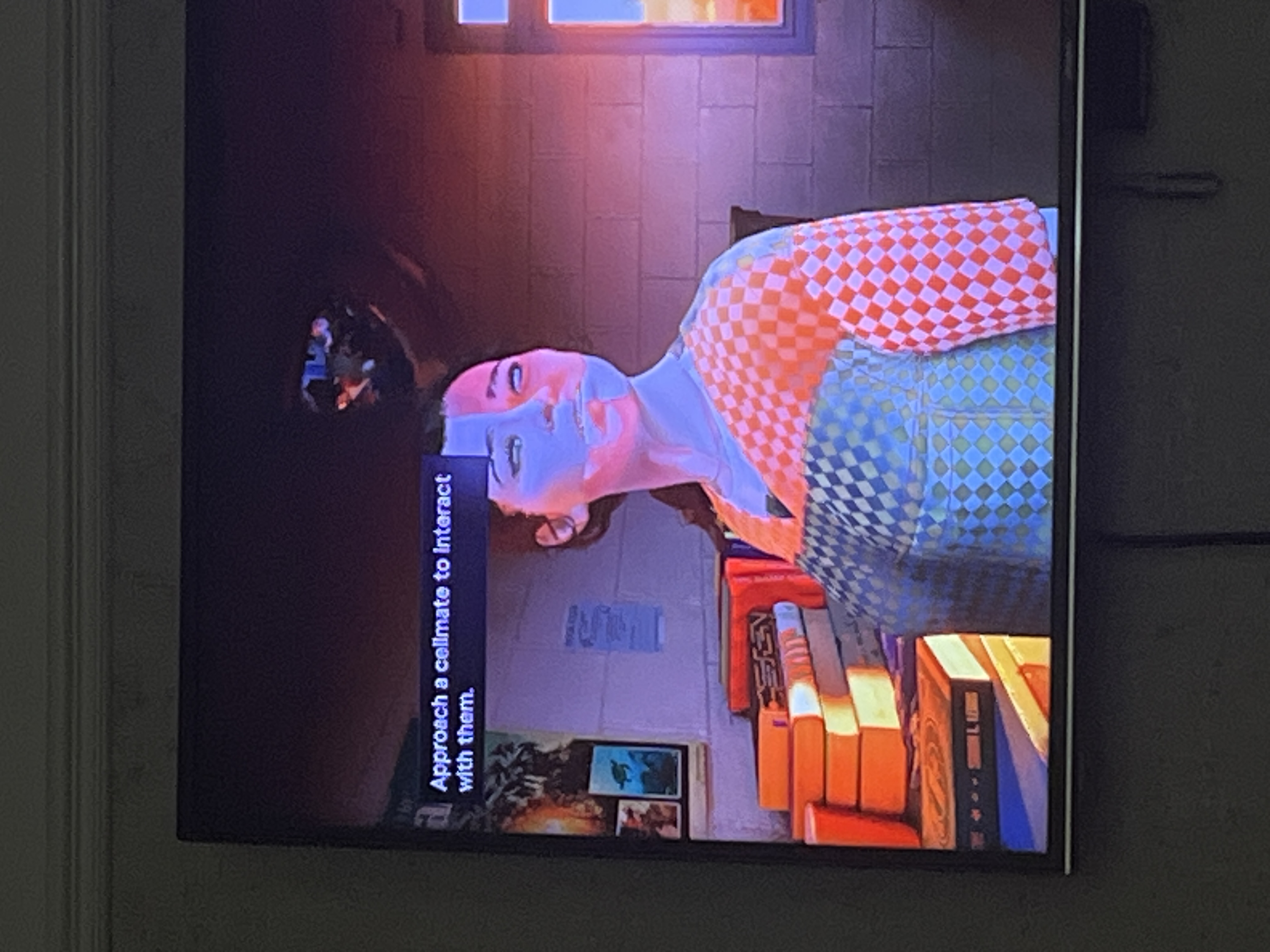
GTA 6 characters look robotic with checkered skin (textures not loading in cutscenes)
When I was in the cutscene at the start everyone looks robotic it’s like the skin didn’t load properly on the characters
Quick answerReported on Xbox Series X|S; no official patch as of . 2 player fixes, most-confirmed first: “Let the install finish first”. See Fix #1 below ↓
Update 01.002.002 is out (23. Nov. 2026). Rockstar hasn't said if it fixes this bug: update, test it and vote on the fix below.
Workaround
It's the same texture-streaming problem as the white-buildings intro bug, and in most clips faces load in a few seconds into the scene.
2 different fixes players reported. Try them one at a time: if Fix #1 doesn't help, open Fix #2.
Fix #1Let the install finish first
- Xbox: My games & apps > Manage > Queue.
- Make sure GTA 6 and its update are fully installed.
- Relaunch the game.
Did Fix #1 work for you?Fix #2Keep it on fast storage
- Settings > System > Storage devices.
- Keep GTA 6 on the internal SSD or a Storage Expansion Card, not a USB drive.
Did Fix #2 work for you?
In jeder E-Mail mit einem Klick abbestellbar.
Still broken? Tell Rockstar
This isn't a share button: it's a complaint that goes to Rockstar. The support form sends a ready report to Rockstar Support (we copy the text, you sign in with your Rockstar account and paste). X and Threads post it publicly with @RockstarSupport / @rockstargames tagged, so Rockstar sees how many players are stuck. The more players do it, the faster it gets fixed.
0players sent it
Preview the report
Subject: GTA VI bug report: characters look robotic with checkered skin (textures not loading in cutscenes)

Hello Rockstar Support,

I'm reporting a bug in Grand Theft Auto VI that many players are hitting.

What happens: When I was in the cutscene at the start everyone looks robotic it’s like the skin didn’t load properly on the characters

What I and other players have already tried (it does not fix it for everyone):
- Let the install finish first
- Keep it on fast storage

Platform: Xbox Series X|S (my console: ____ )
Game version: latest update installed

Full details, steps and reports from other affected players: https://gta6bugs.com/bugs/gta-6-characters-look-robotic-with-checkered-skin-textures-not-loading-102

Please pass this on to the GTA VI team and let us know if a fix is planned.

Thank you
Still broken? Ask other players on Discord · Know a fix? Get paid if it works for others
Was passiert
When I was in the cutscene at the start everyone looks robotic it’s like the skin didn’t load properly on the characters
Spieler melden das
- 1
Screenshots
Quick FAQ
- What is “characters look robotic with checkered skin (textures not loading in cutscenes)” in GTA 6?
- When I was in the cutscene at the start everyone looks robotic it’s like the skin didn’t load properly on the characters
- How do I fix “characters look robotic with checkered skin (textures not loading in cutscenes)”?
- Players reported 2 fixes; try them in order: 1. Let the install finish first — worked for not player-confirmed yet; computersluggish and LagZapper guides. 2. Keep it on fast storage — worked for not player-confirmed yet; Xbox storage rules. Full steps for each are on this page.
- Has Rockstar fixed “characters look robotic with checkered skin (textures not loading in cutscenes)”?
- Not yet. As of Nov 22, 2026 no patch has fixed it. The latest GTA 6 update we track is 01.002.002 (Nov 23, 2026).
- Is “characters look robotic with checkered skin (textures not loading in cutscenes)” only on Xbox?
- So far it is reported on Xbox Series X|S. GTA 6 is out on PS5 and Xbox Series X|S only; there is no PC version.
What should we add or improve?
One tap. GTA6BUGS is built from what players ask for.
Ähnliche Bugs
- 130views
- #0086Glitches
GTA 6 Lucia's teeth glitch in cutscenes
23views

Explore in GTA 6
Gerade angesagt
- 2450views
- 781views
- #0384Spielbrechend
GTA 6 Bricked Up not starting (Boobie won't call, not in the apartment)
Diskussion
Mitdiskutieren
Kein Konto nötig. Bleib fair: keine persönlichen Daten, keine Piraterie- oder Cheat-Links.
Noch keine Antworten. Kannst du es nachstellen? Workaround gefunden? Starte die Diskussion.